Set up a PostgreSQL source, step by step
This guide prepares your PostgreSQL database so a pipeline can read it from its change log: every insert, update and delete arrives as it happens. Choose where your database runs in the tabs below; the steps are the same everywhere, and only what you click differs.
If your database cannot turn on logical replication (Heroku Postgres, for example), a pipeline can read it by queries instead, which needs none of the first two steps: see Reading PostgreSQL by queries.
Before you start
Section titled “Before you start”Only tables in the public schema can be synced for now. A table in another schema is shown so you can see it, and cannot be picked yet.
You need:
- An administrator login for the database: the login that created it, or one that may create roles
(on Amazon RDS and Aurora, the master user; on Google Cloud SQL, the
postgresuser; on Azure, the server’s administrator; on Supabase and Neon, your project’s own console). - A place to run SQL. Each step below says where, for your host.
- Permission in your provider’s console to change the database’s settings and its network rules.
- A moment when a restart is acceptable, on the hosts where turning on logical replication restarts the database. Each tab says whether it does.
1. Turn on logical replication
Section titled “1. Turn on logical replication”Set wal_level = logical in postgresql.conf (or with ALTER SYSTEM SET wal_level = logical; as a
superuser), then restart PostgreSQL: this setting is read only when the server starts. SHOW config_file;,
run as a superuser, prints where postgresql.conf is.
A restart briefly stops the database. Choose a quiet moment.
The setting is rds.logical_replication = 1, in a parameter group. A database on the default
parameter group cannot have it changed, so:
- In the RDS console, open Parameter groups, choose Create parameter group, and pick your engine’s family. For RDS for PostgreSQL the type is DB Parameter Group; for Aurora PostgreSQL it is a DB Cluster Parameter Group.
- Open the new group, choose Edit, set
rds.logical_replicationto1, and Save changes. - Attach it: for RDS, Databases, your instance, Modify, DB parameter group; for Aurora, the cluster’s DB cluster parameter group. Continue and modify.
- Reboot the instance (for Aurora, the writer instance): Databases, the instance, Actions, Reboot. The parameter applies only after a reboot, and a pending one is not applied for you at the next maintenance window.
A reboot is a brief outage. Choose a quiet moment.
In the Google Cloud console, open your instance, choose Edit, go to Flags, and set
cloudsql.logical_decoding to on. Save.
Expect the instance to restart. Google’s setup page says changing this flag requires a restart (its flag table says otherwise), so choose a quiet moment.
In the Azure portal, open your server, then Settings, Parameters. Set wal_level to logical, and
max_worker_processes to at least 16. Choose Save: these are static parameters, so choose
Save and Restart.
The restart briefly stops the server. Choose a quiet moment.
Nothing to switch on. Logical replication needs the direct connection (port 5432 on
db.<project>.supabase.co), never the connection pooler.
The direct connection has IPv6 addresses only, and we connect over IPv4: enable the IPv4 add-on in your project’s settings (a Pro plan add-on, charged by Supabase). Switching it on can drop direct connections for a short moment.
In the Neon console, open your project’s Settings, then Postgres, then Logical replication, and choose Enable.
This restarts all of the project’s computes, dropping the connections they hold, and it cannot be
turned off again. Use the direct connection string afterwards (the host without -pooler).
2. Create the role the pipelines sign in as
Section titled “2. Create the role the pipelines sign in as”The role needs to sign in, to read the tables, and the right to read the change log (REPLICATION). Run
the statements as the administrator. Replace <role>, <a strong password> and <database>.
Where: psql, or any SQL client (pgAdmin, DBeaver), connected to the database as a superuser.
CREATE ROLE <role> WITH LOGIN REPLICATION PASSWORD '<a strong password>';GRANT CONNECT ON DATABASE <database> TO <role>;GRANT USAGE ON SCHEMA public TO <role>;GRANT SELECT ON ALL TABLES IN SCHEMA public TO <role>;Where: a SQL client (psql, pgAdmin, DBeaver) connected as the master user, to the instance’s endpoint
and port (on its Connectivity & security tab in the RDS console). The RDS console has no SQL editor for
RDS for PostgreSQL; Aurora’s query editor works only on a cluster with the RDS Data API on.
On RDS and Aurora the right to read the change log is the rds_replication role:
CREATE ROLE <role> WITH LOGIN PASSWORD '<a strong password>';GRANT rds_replication TO <role>;GRANT CONNECT ON DATABASE <database> TO <role>;GRANT USAGE ON SCHEMA public TO <role>;GRANT SELECT ON ALL TABLES IN SCHEMA public TO <role>;Where: Cloud SQL Studio in the console (your instance, then Cloud SQL Studio; it asks for the
database, user and password, and needs the Cloud SQL Studio User role in your project), signed in as
postgres. Or Cloud Shell: gcloud sql connect <instance> --user=postgres.
CREATE ROLE <role> WITH LOGIN PASSWORD '<a strong password>';ALTER USER <role> WITH REPLICATION;GRANT CONNECT ON DATABASE <database> TO <role>;GRANT USAGE ON SCHEMA public TO <role>;GRANT SELECT ON ALL TABLES IN SCHEMA public TO <role>;Where: pgAdmin, or psql in Azure Cloud Shell, connected as the server’s administrator, on port
5432 (6432 is the built-in connection pooler, which replication cannot use).
CREATE ROLE <role> WITH LOGIN PASSWORD '<a strong password>';ALTER ROLE <role> WITH REPLICATION;GRANT CONNECT ON DATABASE <database> TO <role>;GRANT USAGE ON SCHEMA public TO <role>;GRANT SELECT ON ALL TABLES IN SCHEMA public TO <role>;Where: the SQL Editor in your Supabase dashboard (it runs as postgres).
CREATE ROLE <role> WITH LOGIN REPLICATION PASSWORD '<a strong password>';GRANT CONNECT ON DATABASE <database> TO <role>;GRANT USAGE ON SCHEMA public TO <role>;GRANT SELECT ON ALL TABLES IN SCHEMA public TO <role>;Where: the SQL Editor in your Neon console, on this database. A role made with SQL has no right to the change log until it is given one:
CREATE ROLE <role> WITH LOGIN PASSWORD '<a strong password>';ALTER ROLE <role> REPLICATION;GRANT CONNECT ON DATABASE <database> TO <role>;GRANT USAGE ON SCHEMA public TO <role>;GRANT SELECT ON ALL TABLES IN SCHEMA public TO <role>;SELECT ON ALL TABLES covers the tables that exist now. A table created later needs its own
GRANT SELECT ON <table> TO <role>; before a pipeline can copy it.
3. Allow our addresses
Section titled “3. Allow our addresses”Your database must accept connections from the addresses we connect from. The source form (Sources › Add a
source) shows them, with a copy button, and so does GET /v1/network; a planned change of address is shown at least 30 days ahead.
We connect over IPv4.
Add a line per address to pg_hba.conf, then reload PostgreSQL (a reload, not a restart):
hostssl <database> <role> <address> scram-sha-256A logical replication connection names a database, so the replication keyword in the database column
does not match it. Allow the addresses in any firewall in front of the server too.
Allow the addresses on port 5432 in the database’s security group. We connect from outside its VPC, so the instance must be public: Publicly accessible is Yes under Security on its Connectivity & security tab. A private instance is reached through a jump server (bastion) you run: An SSH tunnel.
Add the addresses as the instance’s authorized networks.
Add the addresses to the server’s firewall rules.
If you restrict which addresses may connect to the project, allow ours. Use the direct connection with the IPv4 add-on (step 1).
Nothing to allow unless your project has IP allow rules on; then add the addresses to them.
4. Create the source, test it, and create the pipeline
Section titled “4. Create the source, test it, and create the pipeline”In the app, open Sources and press Add a source. Under Where is your database hosted? (optional), choose your host. The choice changes nothing that is saved: it picks the setup steps the page shows for that host, beside the form on a wide screen and under Show the setup guide on a narrower one.
Give the source a Name, then the Host, Port and Database, the User you created in step 2 and its Password. Or open Paste a connection URL instead and paste one URL, the password in it.
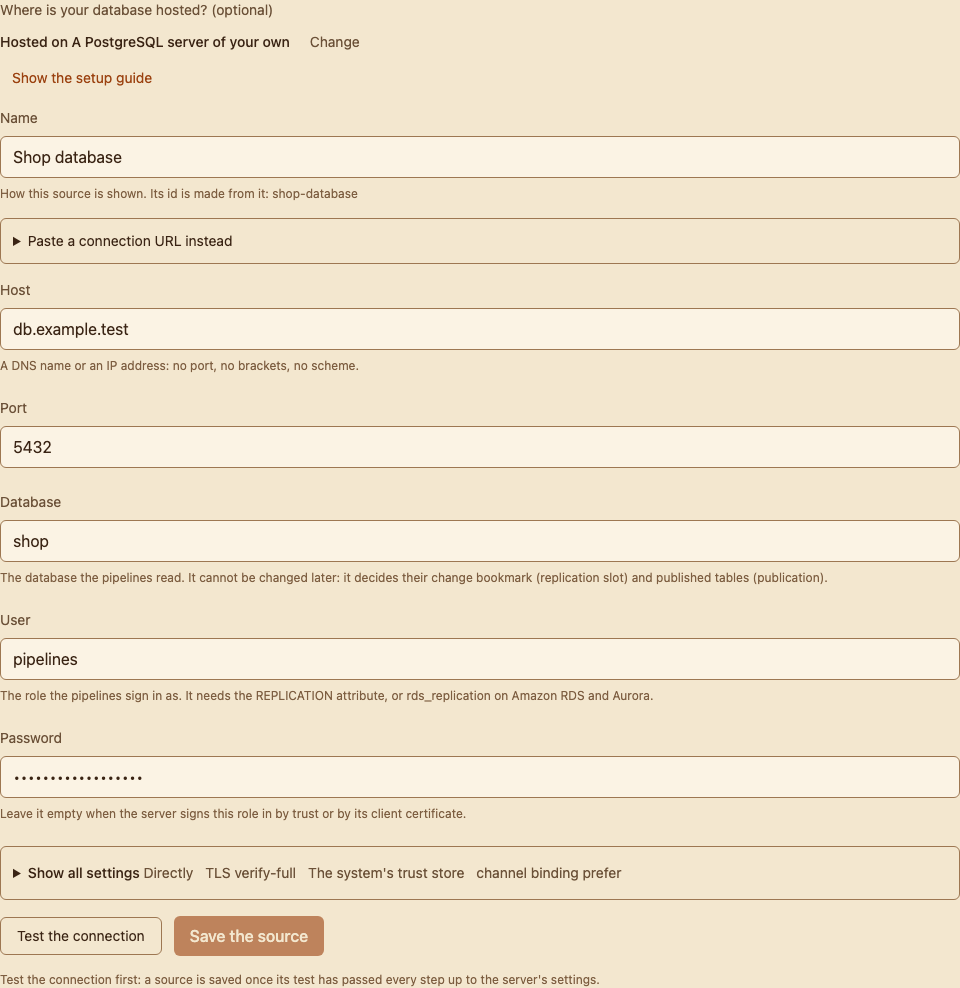
How the server’s certificate is checked is under Show all settings: Encryption (TLS) starts at
verify-full, and Trusted to verify the server at the system’s trust store, which is right for a server
whose certificate a public authority signed. On Amazon RDS and Aurora choose Amazon RDS and Aurora as the
trust instead: the system’s trust store does not verify an RDS instance. The setup steps for your host (beside
the form, or under Show the setup guide) say what to choose for the others, and
TLS explains every choice. A pasted URL is saved with the mode its sslmode
names: a provider’s URL often says sslmode=require, which encrypts the connection without proving the server,
so change it to sslmode=verify-full unless your host’s steps say otherwise.
Press Test the connection. The test shows each stage of the connection in order (Network, Security, Sign-in, Server), with how each one ended:
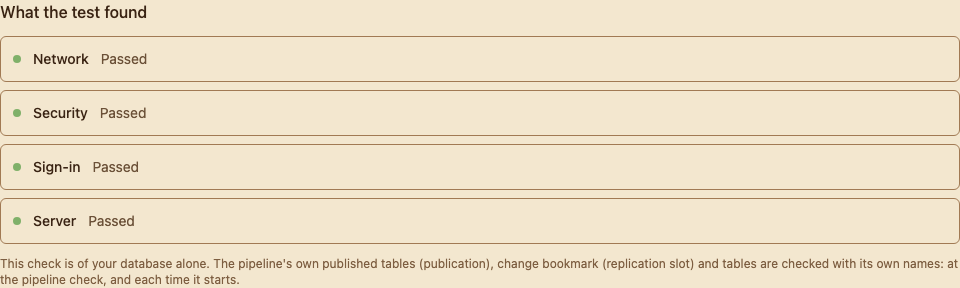
A stage that fails opens to the step that failed, which says why and what to change:
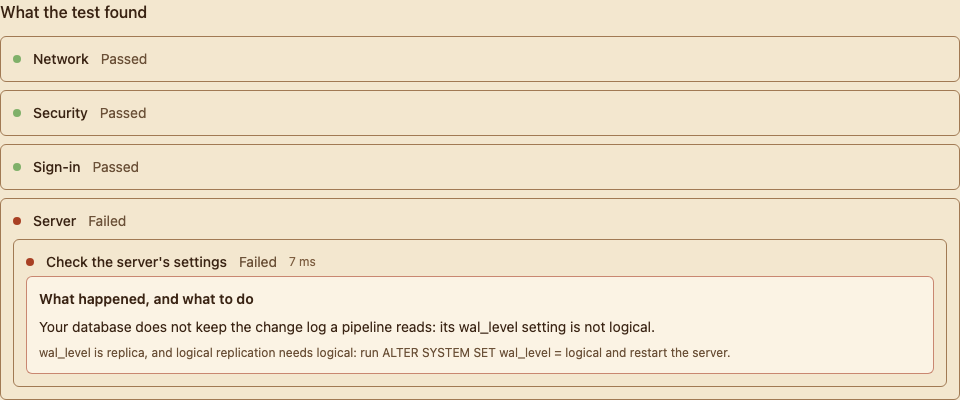
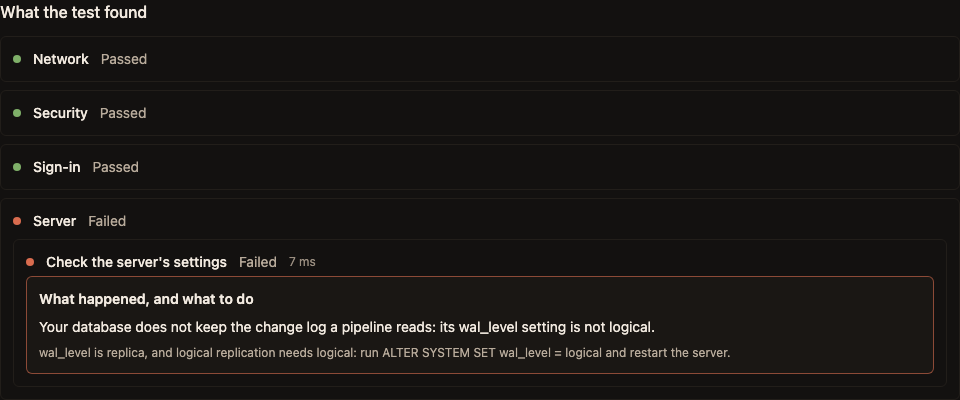
Troubleshooting PostgreSQL has every message with what to do, and the connection test lists every step and message. A server whose certificate nothing you trust has signed shows the certificate it presents, for you to approve: compare its SHA-256 with your server’s own before you do. A pasted URL cannot carry an approved certificate: to approve one, give the connection field by field.
When the test has passed, press Save the source. It cannot be saved before: the form keeps it closed until a test of exactly what it would save has passed every step up to the server’s settings. (If this deployment cannot reach your host from where the test runs, the form says so and offers Save it untested; the pipeline’s start checks it then.)
Then, under Pipelines, press New pipeline, choose Use a saved source and the source you saved, and carry on through the steps: Your first pipeline says what each one asks. You can also give the connection there instead, with Paste a connection URL or Enter the details; the details are saved as a source once their test passes.
5. Run the statements the pipeline shows
Section titled “5. Run the statements the pipeline shows”When you create a pipeline, it shows the statements to run on your database, with that pipeline’s own names, and we never run them for you. They look like this example (the names and the table are yours):
Run the first ones now. Each one is for a single table, and refuses, changing nothing, if that table is not ready for it (the message says what to change):
CREATE PUBLICATION reyansh_pub_orders_ac7c90565434c477 WITH (publish_via_partition_root = true);DO $reyansh$DECLARE t regclass := pg_catalog.format('%I.%I', E'public', E'<table>')::regclass; pub text := E'reyansh_pub_orders_ac7c90565434c477'; m regclass; ident "char"; usable boolean; immediate boolean; pk boolean; full_ok boolean; why text; ways text[]; bad record;BEGIN IF EXISTS (SELECT FROM pg_catalog.pg_publication_rel r JOIN pg_catalog.pg_publication p ON p.oid = r.prpubid WHERE p.pubname = pub AND r.prrelid = t) THEN RETURN; END IF; FOR m, ident IN SELECT c.oid, c.relreplident FROM pg_catalog.pg_class c WHERE c.oid IN (SELECT t::oid UNION SELECT relid::oid FROM pg_catalog.pg_partition_tree(t)) ORDER BY c.oid <> t, c.oid::regclass::text LOOP SELECT i.indisvalid AND i.indimmediate AND i.indisunique AND i.indpred IS NULL, i.indimmediate INTO usable, immediate FROM pg_catalog.pg_index i WHERE i.indrelid = m AND CASE ident WHEN 'd' THEN i.indisprimary WHEN 'i' THEN i.indisreplident ELSE false END; CONTINUE WHEN ident = 'f' OR usable; why := CASE WHEN ident = 'n' THEN 'has REPLICA IDENTITY NOTHING' WHEN ident = 'd' AND immediate IS NULL THEN 'has no primary key' WHEN ident = 'd' AND NOT immediate THEN 'has a DEFERRABLE primary key, which PostgreSQL cannot use as a replica identity' WHEN ident = 'd' THEN 'has a primary key whose index is not valid, which PostgreSQL cannot use as a replica identity' WHEN immediate IS NULL THEN 'has a replica identity index that no longer exists, which PostgreSQL takes as REPLICA IDENTITY NOTHING' ELSE 'has a replica identity index that PostgreSQL cannot use (it is not valid)' END; pk := EXISTS (SELECT FROM pg_catalog.pg_index i WHERE i.indrelid = m AND i.indisprimary AND i.indisvalid AND i.indimmediate AND i.indisunique AND i.indpred IS NULL); full_ok := true; IF pg_catalog.current_setting('server_version_num')::int >= 150000 THEN full_ok := NOT EXISTS (SELECT FROM pg_catalog.pg_publication_rel r JOIN pg_catalog.pg_publication p ON p.oid = r.prpubid WHERE (p.pubupdate OR p.pubdelete) AND r.prattrs IS NOT NULL AND r.prrelid IN (SELECT m::oid UNION SELECT relid::oid FROM pg_catalog.pg_partition_ancestors(m))); END IF; IF full_ok AND pg_catalog.current_setting('server_version_num')::int >= 180000 THEN full_ok := NOT EXISTS (SELECT FROM pg_catalog.pg_attribute a WHERE a.attrelid = m AND a.attnum > 0 AND NOT a.attisdropped AND a.attgenerated <> ''); END IF; ways := CASE WHEN pk THEN ARRAY['REPLICA IDENTITY DEFAULT, which uses its primary key'] WHEN ident = 'd' AND immediate IS NOT NULL AND NOT immediate THEN ARRAY['its primary key dropped and added again NOT DEFERRABLE'] WHEN ident = 'd' AND immediate IS NOT NULL THEN ARRAY['its primary key dropped and added again'] WHEN ident = 'd' THEN ARRAY['a primary key'] ELSE ARRAY['a primary key and REPLICA IDENTITY DEFAULT'] END; IF full_ok THEN ways := ways || 'REPLICA IDENTITY FULL'::text; END IF; RAISE EXCEPTION '%', pg_catalog.format('%s is not added to the publication %I: %s %s, and published without a replica identity PostgreSQL refuses every UPDATE and DELETE on it. Nothing was changed.', t, pub, m, why) USING HINT = pg_catalog.format('Give %s %s, then run this again.', m, pg_catalog.array_to_string(ways, ', or ')); END LOOP; IF pg_catalog.current_setting('server_version_num')::int >= 180000 THEN SELECT c.oid::regclass AS member, a.attname, a.attgenerated = 'v' AS virtual, CASE c.relreplident WHEN 'f' THEN 'REPLICA IDENTITY FULL, every column' WHEN 'd' THEN 'its primary key' ELSE 'its replica identity index' END AS identity INTO bad FROM pg_catalog.pg_class c JOIN pg_catalog.pg_attribute a ON a.attrelid = c.oid AND a.attnum > 0 AND NOT a.attisdropped AND a.attgenerated <> '' JOIN pg_catalog.pg_publication p ON p.pubname = pub AND (p.pubupdate OR p.pubdelete) AND (a.attgenerated = 'v' OR p.pubgencols <> 's') WHERE c.oid IN (SELECT t::oid UNION SELECT relid::oid FROM pg_catalog.pg_partition_tree(t)) AND c.relkind <> 'p' AND (c.relreplident = 'f' OR EXISTS (SELECT FROM pg_catalog.pg_index i WHERE i.indrelid = c.oid AND CASE c.relreplident WHEN 'd' THEN i.indisprimary WHEN 'i' THEN i.indisreplident ELSE false END AND a.attnum = ANY (i.indkey::int2[]))) ORDER BY c.oid <> t, c.oid::regclass::text, a.attgenerated <> 'v', a.attnum LIMIT 1; IF FOUND THEN RAISE EXCEPTION '%', pg_catalog.format('%s is not added to the publication %I: on PostgreSQL 18 or later a publication that sends a table''s updates and deletes refuses every UPDATE and DELETE of it while its replica identity holds a generated column the publication does not send, and the replica identity of %s (%s) holds the generated column %I, %s. Nothing was changed.', t, pub, bad.member, bad.identity, bad.attname, CASE WHEN bad.virtual THEN 'which is VIRTUAL, and no publication sends a VIRTUAL column' ELSE pg_catalog.format('which is STORED, and %I does not send stored generated columns', pub) END) USING HINT = CASE WHEN bad.virtual THEN pg_catalog.format('Give %s a replica identity without a generated column (a primary key, or REPLICA IDENTITY USING INDEX, on columns that are not generated), then run this again.', bad.member) ELSE pg_catalog.format('Have the publication %I send stored generated columns (its publish_generated_columns option set to stored, which applies to every table it lists), or give %s a replica identity without a generated column, then run this again.', pub, bad.member) END; END IF; END IF; EXECUTE pg_catalog.format('ALTER PUBLICATION %I ADD TABLE ONLY %s', pub, t);END$reyansh$;The last one creates the pipeline’s change bookmark (its replication slot). Run it right before you start the pipeline, not earlier: a slot holds your database’s change log from the moment it exists, even while nothing reads it.
DO $reyansh$ BEGIN IF pg_catalog.current_setting('server_version_num')::int >= 170000 AND NOT pg_catalog.pg_is_in_recovery() THEN PERFORM pg_catalog.pg_create_logical_replication_slot('reyansh_orders_ac7c90565434c477', 'pgoutput', failover => true); ELSE PERFORM pg_catalog.pg_create_logical_replication_slot('reyansh_orders_ac7c90565434c477', 'pgoutput'); END IF; END $reyansh$;Run it signed in as the role the pipeline uses; any role with the right to read the change log may run it too, and on a server of your own a superuser may.
Where: psql, or any SQL client, connected to this database as an administrator. That is a superuser, or the role that owns these tables and may create in this database.
Where: a SQL client connected to this database as the role that owns these tables and may create in this database.
Where: a SQL client connected to this database as the role that owns these tables and may create in this database.
Where: a SQL client connected to this database as the role that owns these tables and may create in this database.
Where: the SQL Editor of your Supabase project.
Where: the SQL Editor in your Neon console, on this database.
Doing this with the API or Terraform instead: see The REST API and Terraform.